
Creating the same character from multiple angles is hard for AI. The character often looks different in each image. This guide shows you how to make consistent character sheets using GLM-4.
What is a Character Sheet?
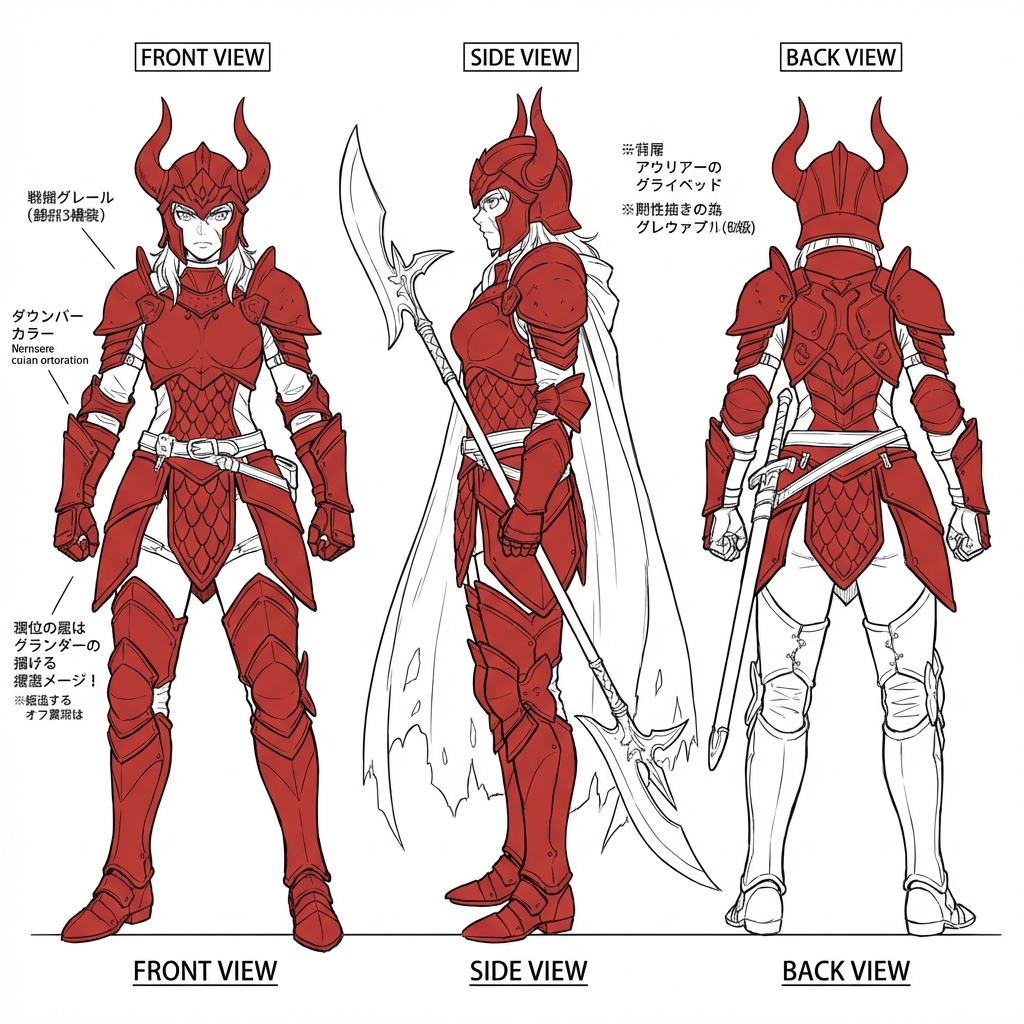
A character sheet shows the same person or creature from different views. Artists use them to:
- Show front, side, and back views
- Keep designs consistent across projects
- Help 3D modelers build accurate models
Game designers, animators, and comic artists all use character sheets.
The Challenge with AI
Most AI models struggle with consistency. You ask for "the same woman from the front" and "the same woman from the side." But you get two different women.
This happens because AI generates each image separately. It does not remember what it made before.
How to Get Consistent Results
GLM-4 learns from millions of 3D models. It understands how objects look from different angles. Here is how to use it:
Step 1: Add style keywords
Include these words in every prompt:
- "character sheet"
- "orthographic view"
- "white background"
- "multiple angles"
Step 2: Describe details once
Write all character details in the first prompt:
- Hair color and style
- Clothing and accessories
- Body type and pose
Step 3: Keep prompts similar
Change only the angle between prompts. Keep everything else the same.
Sample Prompts
Here are prompts you can try in our generator:
Full character sheet (one image):
"character sheet, orthographic view, white background, female warrior with red armor, front view, side view, back view, full body"
Front view only:
"female warrior with red armor, front view, standing pose, white background, full body, character reference"
Side profile:
"female warrior with red armor, side profile, standing pose, white background, full body, character reference"
Pro Tips
- Use "orthographic" to get flat, distortion-free views
- Add "same character" to reinforce consistency
- Generate at 1:1 aspect ratio for square sheets
Start making your character sheet now. Open our generator and paste the sample prompt above.